

Editorial date: . First published October 19, 2026.
Self-hosted email server cost: budget the operation, not the VM
A mail server invoice is not a mail service budget. Separate outbound application sending from mailbox hosting, then count storage, recovery, network policy, maintenance, and the engineering time your design actually needs.
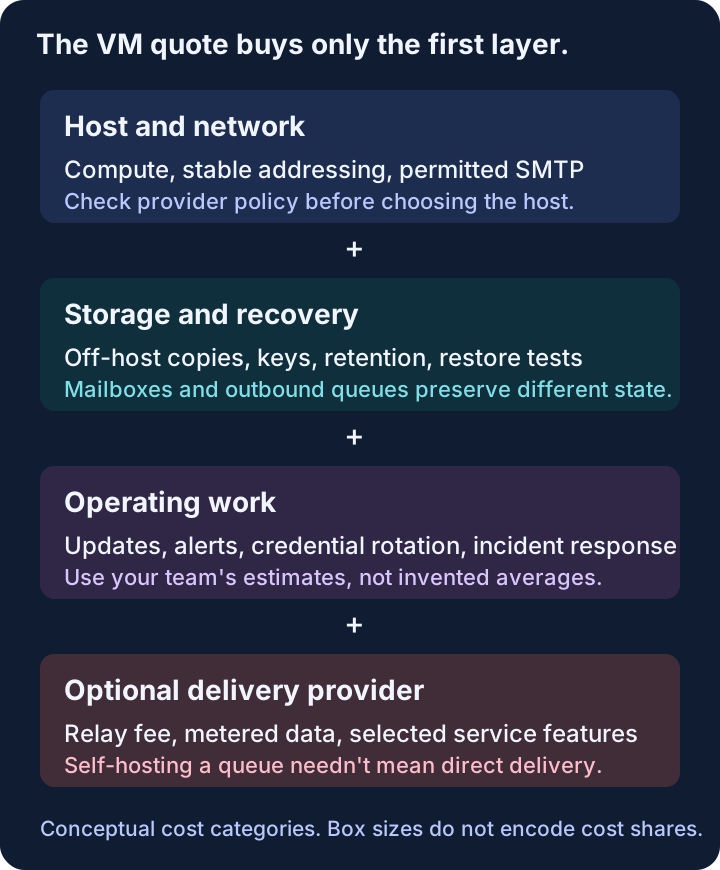
First decide what “email server” means
An outbound queue for application notifications, a complete employee mailbox service, and a newsletter platform aren’t the same project. A cost estimate that switches between them halfway through will produce an impressive number and a bad decision.
For outbound application mail, you need submission, access controls, queue behavior, authenticated sending, recipient policy, and a way to explain failures. For hosted mailboxes, add incoming spam filtering, mailbox storage, user authentication, client access, account recovery, and restoration of lost mail.
A campaign application adds another layer: audience management, consent, preferences, scheduling, and often editing and reporting. Installing an MTA doesn’t build that layer. Conversely, you shouldn’t charge an outbound-only design for a full webmail suite it doesn’t need.
Write the scope as a sentence: “We need this application to send receipts to customers,” or “We need to host these employee mailboxes.” Then list the work required to keep that sentence true during upgrades and failures. That’s the budget’s starting point.
A small server can be sufficient, but choose the right reference
Postfix is a mail transfer agent with configurable local destinations, trusted networks, and relay behavior. Its scope is different from an integrated mail suite. Don’t use one project’s resource requirements as proof of what the other must cost.
As checked in October 2026, mailcow’s system requirements list a default minimum of 6 GiB of RAM plus 1 GiB of swap and 20 GiB of disk without emails. That’s a useful concrete constraint when pricing a mailcow deployment. It’s not a universal lower bound for all mail servers.
For either design, allow headroom for the actual workload and chosen components. Mailbox indexes, filtering, concurrent clients, message size, and retained queue data can matter more than the raw message count. A minimum configuration tells you where a project starts, not how much capacity your workload needs.
Avoid the opposite mistake too: treating every self-hosted installation as if it requires a dedicated infrastructure department. Existing expertise and existing monitoring can reduce incremental work. The estimate should reflect your team, not a horror story borrowed from somebody else’s outage.
Network policy can invalidate the cheapest quote
Check SMTP connectivity and hosting terms before paying for a VM. The server’s ability to accept an installation command says nothing about its permission to deliver mail directly to receiving servers.
For example, DigitalOcean’s documented policy, checked in October 2026, blocks SMTP ports 25, 465, and 587 on Droplets by default, including traffic through Reserved IPs. That’s a provider-specific constraint, not a statement that every hosting provider blocks SMTP.
For direct delivery, confirm outbound port 25, the ability to configure appropriate reverse DNS, and the provider’s acceptable-use and abuse process. Also check whether the IP address is stable enough for the operating model you intend. A replacement host with a different IP isn’t always an operationally identical replacement.
A relay architecture changes this requirement. Your server can submit through a permitted provider interface while the provider handles internet delivery. That can be a good design, but label the relay charge and dependency honestly. You’re self-hosting part of the system, not eliminating all delivery-provider costs.
The ESP, SES, and self-hosting comparison shows why these hybrids belong on the decision sheet rather than being dismissed as impure.
Price backups as a recovery capability
Mailbox backup is not just renting another disk. You need a consistent set of data, the keys and configuration required to read it, a retention policy, and a way to restore it somewhere safe.
mailcow’s backup documentation identifies multiple backup components, including mailbox data, cryptographic material, databases, and service state. Its tooling helps perform the work; the operator still chooses the schedule, storage location, access policy, and recovery procedure.
A backup on the same host doesn’t cover losing the host. A remote copy nobody has restored doesn’t establish recovery time. Include a periodic restore exercise in the budget, and write down the acceptable data-loss window and restoration target in plain language.
For an outbound-only system, the retained state is different but still matters. Losing a queue or attempt ledger can turn recovery into duplicate sending. Preserve enough evidence to distinguish work never attempted from work possibly accepted by a provider. Recovery should not mean replaying everything because the database is blank.
Don’t ignore privacy while adding copies. Message bodies and recipient addresses can be sensitive data. More retention increases both storage and access-control responsibilities. Keep the minimum evidence needed for the service you’re operating, rather than backing up every log forever.
Use a formula with visible assumptions
A useful monthly model is:
Infrastructure + storage and recovery + relay or delivery charges + recurring engineering time + amortized setup.
Keep incident exposure as a separate scenario. Calling an invented outage probability an “expected cost” doesn’t make it evidence.
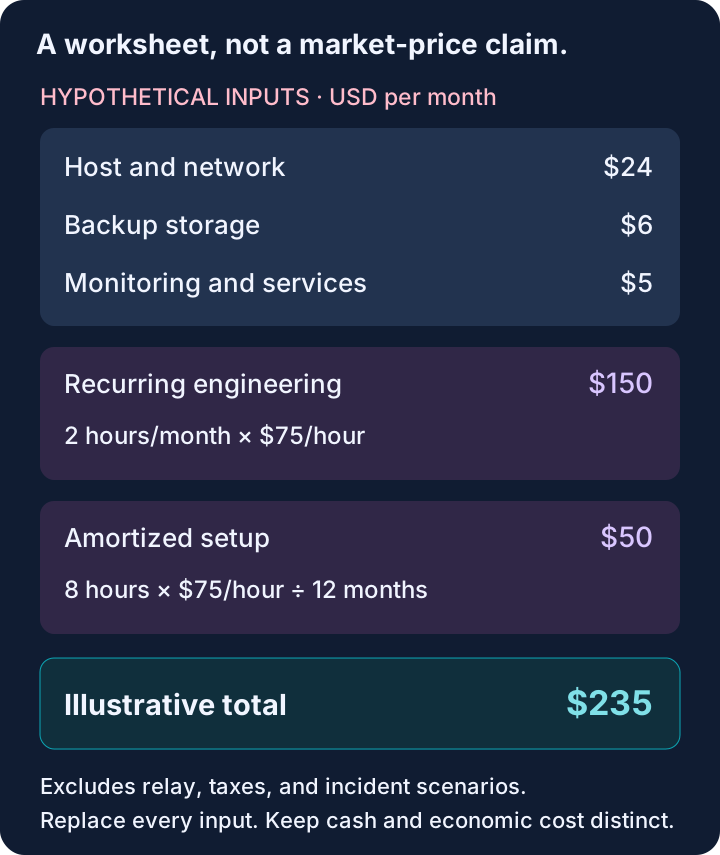
Here’s a deliberately hypothetical worksheet in USD. These are planning inputs, not vendor quotes, measured maintenance time, or a claim about the typical mail server.
| Input | Illustrative assumption | Monthly contribution |
|---|---|---|
| Host and network | $24/month placeholder | $24 |
| Off-host backup storage | $6/month placeholder | $6 |
| Monitoring and other services | $5/month placeholder | $5 |
| Recurring engineering | 2 hours at $75/hour | $150 |
| Setup amortization | 8 hours at $75/hour over 12 months | $50 |
| Illustrative total | Before relay, taxes, or incidents | $235 |
The arithmetic is the point, not the selected values. Replace every input. If the work is a hobby and its hours are the reward, don’t pretend they are unwanted labor. If it’s business infrastructure, the same hours have an opportunity cost even when no additional salary payment appears on an invoice.
Also calculate a first-year cash view separately from an economic-cost view. In the cash view, include actual setup purchases and additional contractor or payroll payments when they occur; in the economic view, also value internal engineering time. Setup happens up front, while amortization spreads it for comparison. Keep those views separate so the person approving the project can see both the cash requirement and the work it consumes.
Compare relay prices without inventing total-bill parity
As of October 2026, AWS’s SES pricing page lists à-la-carte outbound sending at $0.10 per 1,000 emails, with additional applicable data and optional-feature charges. It also lists bundled SES pricing plans, so check the account’s active plan rather than assuming the lowest base rate applies automatically.
At the à-la-carte base rate, 100,000 recipient sends would be $10 in sending charges. That’s arithmetic from the listed rate, not an estimate of the whole system. Add data, selected services, application infrastructure, and engineering where applicable. Count recipients consistently; a multi-recipient message isn’t necessarily one billable unit.
An ESP subscription may cost more than raw sending and less than maintaining the controls around it. It may also charge for capacity you don’t use. Compare your expected monthly workload, peak demand, required features, and support arrangement, not just full-allowance utilization on the pricing card.
If direct SES is the comparison, use the production setup checklist to inventory the operating work. Otherwise the self-hosted column will include engineering while the SES column quietly assumes the same work happens for free.
Budget for ownership changes, not just ordinary Tuesdays
Routine maintenance includes security updates, certificate health, disk usage, queue growth, abuse handling, credential rotation, and checks that monitoring still reaches somebody. Some tasks are automated. Automation still has an owner when it fails.
The harder test is replacement. Can a second engineer rebuild the host from documented configuration? Can they retrieve the required secrets through the approved secret store? Can they restore a mailbox without restoring an old suppression database that accidentally permits future sends? Is there a sending pause that works while recovery happens?
Create a few explicit scenarios instead of one inflated contingency line: a failed disk, a compromised application credential, a provider network restriction, and the maintainer being unavailable. Estimate the response work locally. Don’t convert speculative support hours into a published industry statistic.
When paying for a service is the smaller project
SendHog, which we build, is a managed SES-based application sending service. It covers domain setup, scoped keys, SDKs, retained outcomes, recipient accounting, idempotency, and suppression handling. Check pricing and subscription rules for the commercial terms, then the API reference and sending guide for permission boundaries, outcome definitions, and current feature limits. Cost comparisons need both sides of that check. It isn’t employee mailbox hosting, inbound SMTP, or guaranteed inbox placement.
Another ESP may be better for a particular support model or workflow. Direct SES may be better if your team already maintains the necessary AWS controls. Self-hosting can be better when control, mailbox requirements, or existing expertise justify the operation.
The cheapest host is useful information. It just isn’t the answer to the cost question. The answer is the price of keeping your actual mail workflow working, explainable, and recoverable after the person who installed it closes their terminal.
Primary sources reviewed October 19, 2026. Provider capabilities and pricing can change.