

Editorial date: . First published October 19, 2026.
ESP vs Amazon SES vs self-hosted email: choose the work you own
An ESP, direct Amazon SES, and an open-source mail server move different responsibilities onto your team. For application email, compare the operating boundary before comparing the price per thousand.
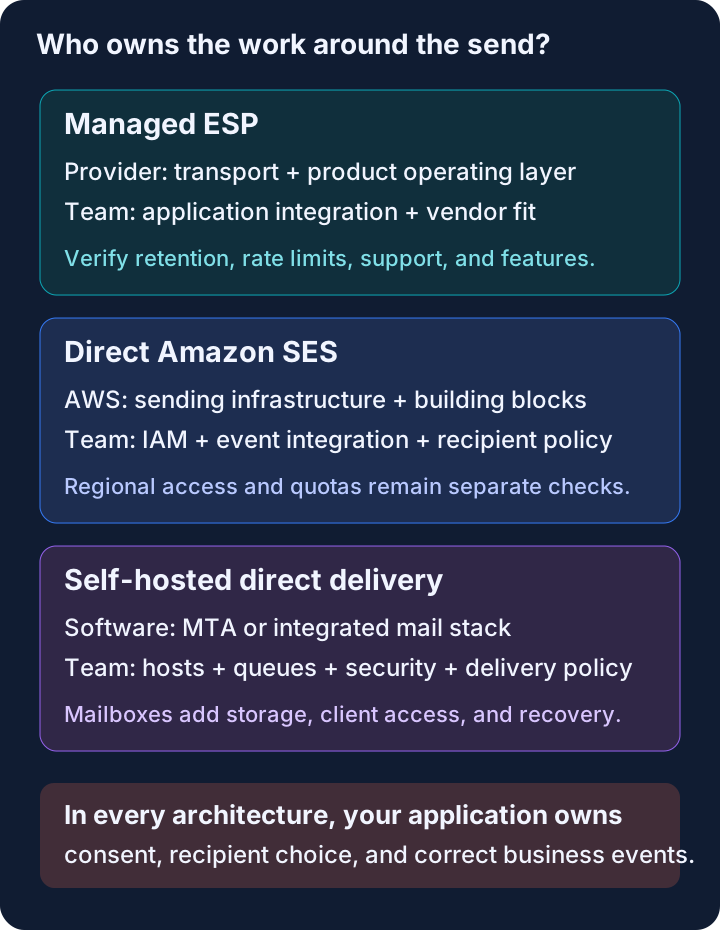
These aren’t three versions of the same product
An email service provider typically sells an application-facing service around delivery infrastructure. Amazon SES sells managed sending infrastructure with APIs and AWS integration points. A self-hosted mail server gives you software to operate. Each can send a receipt; that doesn’t make their ownership models equivalent.
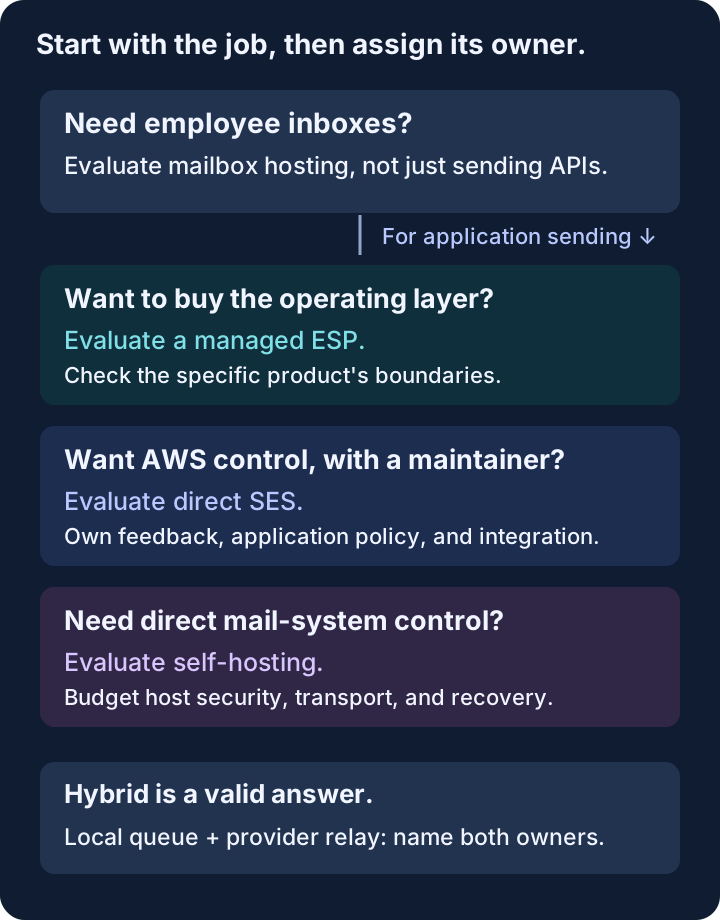
There is overlap. An ESP can run on SES. A self-hosted server can relay outbound mail through a provider. An organization can buy hosted employee mailboxes and use a separate API for application sending. The useful question isn’t “Which bucket is pure?” It’s “Who owns each failure?”
This comparison concerns legitimate transactional and opted-in application email. Employee inboxes, calendar hosting, mailing-list discussion software, and marketing automation are adjacent products with different requirements. Write your workload at the top of the evaluation. Otherwise you’ll compare a sending API with an entire mail suite and call the difference overhead.
Compare responsibilities before feature counts
The table describes typical boundaries, not guarantees about every vendor. Check each shortlisted product’s actual documentation and contract.
| Responsibility | Managed ESP | Direct SES | Self-hosted direct delivery |
|---|---|---|---|
| Application interface | Provider API/SDK, sometimes SMTP | SES API/SDK or SMTP | Your SMTP integration or another application layer |
| Sending hosts and transport | Provider operates | AWS operates | Your team operates |
| Identity and DNS | Guided, customer publishes DNS | Your team configures SES and DNS | Your team configures signing and DNS |
| Feedback and suppression | Product-specific managed behavior | AWS mechanisms; your integration and policy | Your collection, interpretation, and policy |
| Runtime access | Service keys and product roles | AWS identities and permissions | Host, service, and application credentials |
| Mailboxes | Only if explicitly offered | Separate receiving/storage design | Possible with additional stack components |
| Main cost exposure | Plan terms, usage, required features | Metered services plus engineering | Hosts, storage, operations, recovery |
The application remains responsible for recipient selection, consent, and business-event correctness in every column. Buying a service doesn’t make a duplicate “order shipped” event correct. Running a server doesn’t make an old contact list legitimate.
Choose an ESP when its operating layer is what you need
An ESP can make domain setup, credential management, retained events, templates, and debugging available through one product. The value isn’t that an HTTP request has fewer fields. It’s that somebody maintains the paths around it.
Use a concrete support scenario in evaluation: a customer says their receipt never arrived. Can an engineer find the send by recipient or application identifier? Does the product distinguish provider acceptance from receiving-server delivery? Are adverse events visible? Can you determine whether a later attempt would be suppressed?
Different ESPs answer these questions differently. Postmark’s Message Streams separate transactional and broadcast traffic, including infrastructure pools, according to its documentation. Resend’s sending documentation describes its transactional sending interface and links to email-management features. Follow those feature-specific references when evaluating requirements; neither provider’s feature list establishes that its messages always reach the inbox.
Check the less attractive details too: retention duration, account approval, rate limits, plan counting units, support coverage, and how you export suppressions. If a feature is important enough to drive the decision, verify it’s in the plan you’re buying.
An ESP is less compelling when you already have the operating layer, need AWS-specific controls the product doesn’t expose, or can’t accept its data handling or service terms. “Managed” isn’t automatically the right answer.
Choose direct SES when you want AWS control and can maintain the integration
Direct SES is a sensible platform component for a team already comfortable with AWS account boundaries, IAM, deployment automation, and event processing. It lets you build the application-facing policy you actually need rather than adapt to another product’s model.
AWS provides real mechanisms for that work. Configuration sets associate sending with event destinations and other rules. Account-level suppression handles configured bounce and complaint reasons. These capabilities make the DIY route practical; don’t evaluate SES as though it merely opens a socket.
The integration still needs ownership. Somebody must associate sends with the correct configuration, authenticate incoming events, connect outcomes to application records, maintain recipient policy, and react when the pipeline breaks. Our SES production setup review enumerates that boundary.
Regional configuration also matters. AWS’s quota documentation says quotas are regional and based on recipients. Production access, daily allowance, and instantaneous sending rate aren’t the same thing. A monthly estimate can look excellent while a bursty workflow still needs pacing and a queue.
Direct SES becomes less attractive when the integration has no durable owner. A clever setup finished on Friday is not an operating model for the next two years.
Choose self-hosting when control of the mail system is the requirement
Self-hosting is reasonable when routing, mailbox ownership, administrative independence, or specific deployment constraints justify operating mail infrastructure. It’s also a useful learning project. Neither motivation needs to masquerade as the cheapest way to send password resets.
Postfix’s basic configuration guide explains the mail transfer agent’s identity, destinations, and relay boundaries. Postfix is a component you can build around, not a finished transactional email product with your application’s permissions, event history, and suppression policy.
mailcow bundles a broader mail system. Its documented default minimum is 6 GiB of RAM plus 1 GiB of swap, with 20 GiB of disk before email storage. Those requirements make sense for its scope. They don’t mean every outbound-only Postfix installation needs the same resources.
Direct internet delivery also depends on the hosting environment. As checked in October 2026, DigitalOcean documents default SMTP blocks on Droplets for ports 25, 465, and 587. Check the actual provider policy before renting a machine. An allowed container image doesn’t imply allowed SMTP connectivity.
If you run mailboxes, storage and recovery become first-class concerns. If you only send application mail, you still own queue behavior, signing, credentials, host security, and delivery diagnostics. The self-hosted cost model separates these scopes rather than assigning both the price of a tiny VM.
Hybrid architectures are legitimate, but label the boundary
A local Postfix queue with provider relay can be a useful compatibility layer for applications that speak SMTP. You keep local submission and queueing while outsourcing internet delivery. That isn’t fully self-hosted delivery, and it isn’t pointless because a provider remains involved.
Likewise, hosted employee mailboxes and a separate transactional provider are often the least surprising arrangement. The people reading mail need mailbox features. The application emitting receipts needs a sending interface and outcomes. One vendor doesn’t have to satisfy both requirements.
Draw the exact handoff. Who retries a transient receiving-server failure? Who suppresses a hard-bounced address? Who stores the message body? Who may replay a queued business message? A hybrid with two independent retry layers can create problems neither component has alone.
Price the same workload on the same basis
As of October 2026, AWS lists SES à-la-carte outbound sending at $0.10 per 1,000 emails, plus applicable data and optional-service charges. It also lists Essentials, Pro, and Enterprise pricing. Don’t assume every account is using the à-la-carte rate; check its active plan.
Compare actual expected recipients, not the maximum plan allowance you hope to use eventually. Add retained-event storage, monitoring, and the engineering time your chosen boundary requires. For self-hosted mailboxes, add mailbox storage and tested backups. For an ESP, include the plan required for your necessary features.
Keep uncertain costs visible rather than hiding them in a fabricated monthly total. Your team’s maintenance time is a scenario input, not an industry constant. A service with a higher invoice can have lower total cost; a mature in-house stack can reverse that result.
The managed SES option we build
SendHog, which we build, sits in the managed ESP column while using SES for transport. It provides domain setup, scoped sending keys, SDKs, retained outcomes, recipient accounting, idempotency, and suppression handling without requiring a customer’s AWS account.
That boundary is useful for teams that want application sending but not their own AWS email operation. It isn’t a replacement for employee mailboxes, an AWS SDK/SigV4 drop-in endpoint, or a guarantee of inbox placement. Check the quickstart for setup, the API reference for domain-scoped send/read permissions, the sending guide for outcome definitions and current limitations, and the subscription documentation for allowance rules. These public documents establish product boundaries, not independent performance measurements.
Choose a different ESP for capabilities or support you need that it doesn’t provide. Choose direct SES when owning AWS is an advantage. Choose self-hosting when owning the mail system is the point. The best architecture is the one whose recurring responsibilities your team has deliberately accepted, not the one with the shortest installation command.
Primary sources reviewed October 19, 2026. Provider capabilities and pricing can change.